Business Process Mapping: Understanding How Your Business Works
Every business follows a series of steps to complete its daily activities. From receiving a customer enquiry to preparing an invoice, delivering a product, or providing customer support, each task is part of a larger business process.
But what happens when these processes are unclear? Employees may repeat the same work, important tasks may be delayed, and business owners may struggle to understand where things are going wrong.
This is where business process mapping becomes useful.
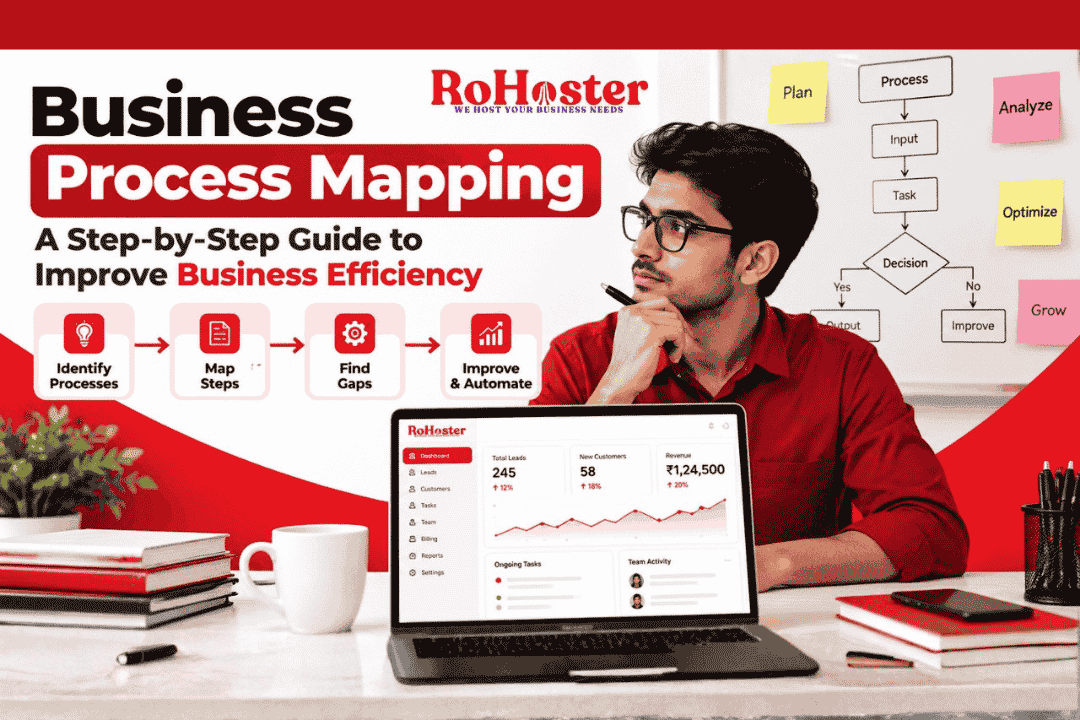
Business process mapping helps businesses visually represent how a task or workflow moves from start to finish. It makes responsibilities, decisions, dependencies, and potential problems easier to identify. To understand the broader concept, you can also explore business process fundamentals on Wikipedia.
Whether you run a small retail shop, a service-based company, a startup, or a growing team, understanding your business processes can help you make better operational decisions. You can also learn how to improve business efficiency without hiring more employees by identifying repetitive tasks and organizing existing workflows.
In this guide, we will explain what business process mapping means, why it matters, and how you can use it to improve everyday business operations.
What Is Business Process Mapping?
Business process mapping is the practice of creating a visual representation of the steps involved in completing a specific business activity.
A process map may show the tasks performed, the people responsible, the decisions that must be made, and the direction in which work moves.
For example, a customer enquiry process might follow these steps:
A potential customer contacts the business.
The enquiry is recorded.
A team member contacts the customer.
The customer's requirements are understood.
A quotation is prepared and shared.
The team follows up and records the outcome.
By mapping this workflow, a business owner can see whether every enquiry has an assigned owner, whether follow-ups are happening on time, and where potential customers may be getting lost.
If your team struggles to organize enquiries, read our guide on why businesses lose leads and how to improve conversions.
Business process mapping is not limited to sales. It can also be used for inventory management, employee onboarding, billing, order processing, customer support, and many other activities.
Why Is Business Process Mapping Important?
As a business grows, informal ways of working can become difficult to manage. What works for a team of two people may not work as effectively for a team of twenty.
Business process mapping helps organizations understand their existing workflows before making changes.
1. Identify Bottlenecks
A bottleneck is a point in a process where work slows down or starts accumulating. For example, if every quotation requires approval from one busy manager, customer responses may be delayed.
A process map helps identify such points so the business can investigate possible improvements. Our article on the hidden cost of poor business processes explains how inefficient workflows can affect productivity and business growth.
2. Clarify Roles and Responsibilities
When responsibilities are unclear, tasks may be missed or completed multiple times. Mapping a workflow makes it easier to understand who handles each step and when a task should move to the next person.
For a broader perspective, explore our guide on building a scalable business system from day one.
3. Reduce Repetitive Work
Some business activities involve unnecessary data entry, repeated approvals, or transferring information between multiple tools. A process map can reveal these inefficiencies and highlight opportunities to simplify the workflow.
Businesses can also learn how to automate repetitive tasks in a growing Indian SME to reduce manual effort where automation is appropriate.
4. Improve Team Productivity
Employees can work more consistently when procedures and expectations are clearly defined. A documented process also helps new team members understand how tasks should be completed.
5. Support Better Business Decisions
Business owners need to understand how work actually happens before deciding whether to change a process, introduce automation, or adopt new software.
A process map provides a clearer starting point for those decisions. If customer communication is one of your team's challenges, our guide on mastering the customer journey from first enquiry to repeat purchase explains why organized processes matter throughout the customer relationship.
The goal is not to create complicated diagrams for every activity. It is to understand important workflows well enough to make them more reliable, efficient, and easier to manage.
For businesses looking to organize leads, customer information, billing, inventory, and other daily operations, RoHoster business management software is worth exploring alongside these process improvement practices.
Types of Business Process Maps
Business process maps can be created in different formats depending on the complexity of a workflow and the information a business wants to understand. Choosing the right format makes it easier for teams to analyze processes and identify opportunities for improvement.
1. Flowcharts
A flowchart represents a process using shapes and arrows. Each shape represents an activity, decision, or starting and ending point, while arrows show the direction of the workflow.
For example, a sales flowchart may show what happens when a customer enquiry arrives, how the sales team qualifies the lead, and what happens if the customer is interested or not interested.
Flowcharts are useful for documenting simple, repetitive workflows and explaining procedures to employees. Businesses can also use them to review lead management best practices and identify gaps in their follow-up process.
2. Swimlane Diagrams
A swimlane diagram divides a workflow into separate lanes, with each lane representing a department, team, or individual responsible for specific activities.
Imagine an order-processing workflow involving the sales, accounts, warehouse, and delivery teams. A swimlane diagram shows which team handles each step and where responsibility passes from one team to another.
This format is particularly useful when several people or departments work together. It helps identify unclear ownership, unnecessary handovers, and delays caused by waiting for approvals.
As your team grows, documenting these responsibilities can support a scalable business system in which daily work does not depend entirely on one person.
3. Value Stream Maps
Value stream mapping examines the flow of work and information required to deliver a product or service. It helps distinguish activities that add value for customers from activities that create delays or unnecessary effort.
For example, a distributor may use value stream mapping to review the time between receiving an order, checking stock, preparing an invoice, packing the goods, and completing delivery.
The goal is to understand the complete workflow rather than improving only one isolated task. This can be useful for businesses dealing with stock movement, order fulfilment, and billing. Read our guide on reducing dead stock and improving business cash flow for another example of improving operational efficiency.
4. High-Level Process Maps
A high-level process map provides a simplified overview of a workflow without documenting every small activity. It usually highlights the major stages, inputs, and outputs.
For example, a customer onboarding process might include enquiry, registration, requirement collection, service activation, and ongoing support.
This format is helpful when business owners need to understand the overall process before examining individual steps in detail. It is also useful for discussing workflows with management and identifying areas that require further analysis.
5. Detailed Process Maps
A detailed process map documents individual activities, decisions, exceptions, and responsibilities. It may include the documents required, the systems used, approval conditions, and what happens when something goes wrong.
For example, a billing workflow could document invoice preparation, tax calculation, payment terms, approval, invoice delivery, and payment follow-up.
Detailed maps are useful for complex or high-risk processes where consistency and accountability matter. Businesses that want to organize their customer records and billing activities can also explore business management software from RoHoster as part of a broader effort to standardize operations.
Which Type of Process Map Should You Choose?
The right format depends on the purpose of the exercise:
Flowchart: Best for simple workflows and decision-making steps.
Swimlane diagram: Best for processes involving multiple people or departments.
Value stream map: Best for identifying delays and unnecessary activities across an entire workflow.
High-level process map: Best for understanding the major stages of a process.
Detailed process map: Best for documenting complex procedures and responsibilities.
Before choosing a format, define the problem you want to solve. If you only need to explain a simple procedure, a flowchart may be enough. If work frequently gets delayed between departments, a swimlane diagram may provide more useful insights.
You can learn more about the broader concept of workflow and how activities are organized to complete a task.
The most important point is to choose a format that your team can understand, maintain, and use to make practical improvements.
How to Create a Business Process Map Step by Step
Creating a business process map does not require expensive software or advanced technical knowledge. You can begin with a simple workflow, document how it currently operates, and improve it gradually.
Follow these steps to create a useful process map for your business.
Step 1: Choose the Process You Want to Map
Start by selecting one specific business activity that needs improvement. Avoid mapping every business operation at once.
For example, you could choose lead follow-up, customer onboarding, inventory management, invoice generation, or employee onboarding.
Choose a process that frequently causes delays, involves repetitive tasks, or creates confusion among team members. If customer enquiries are being missed, begin with your sales process. Our guide on how to manage leads and follow-ups without missing opportunities can help you understand why an organized follow-up system matters.
Step 2: Define the Starting Point and End Point
Every process map needs a clear beginning and ending.
For example, a sales process might begin when a potential customer submits an enquiry and end when the deal is won, lost, or closed without a sale.
Defining these boundaries keeps the map focused and prevents unrelated activities from making it unnecessarily complicated.
You should also identify what triggers the process, what outcome it should produce, and how you will measure whether it is successful.
Step 3: Gather Information from the People Doing the Work
Do not create a process map based only on how you think a task should happen. Speak with the employees who perform it every day.
Ask questions such as:
What do you do first when a new task arrives?
Which information or documents do you need?
Who approves or reviews the work?
Where do delays usually occur?
Which activities are repeated manually?
What happens when something goes wrong?
This step helps you document the actual workflow rather than an idealized version of it. It can also reveal communication gaps and unclear responsibilities that affect team performance.
Step 4: List Every Major Activity in Sequence
Write down the activities in the order in which they happen. Start with the main tasks and add decision points wherever the next step depends on a particular condition.
For example, a basic lead management workflow could look like this:
Receive a customer enquiry.
Record the enquiry and contact details.
Assign the lead to a salesperson.
Contact the customer and understand their requirements.
Schedule a follow-up if the customer needs more time.
Prepare a quotation when appropriate.
Record whether the deal is won or lost.
This sequence can become the foundation of your process map. For more ideas, explore lead management best practices to increase sales.
Step 5: Draw the Process Map
Choose a format that suits the workflow. A flowchart is usually sufficient for a straightforward process, while a swimlane diagram is more useful when several departments share responsibility.
Use consistent symbols for activities, decisions, and the start or end of the workflow. Connect the steps with arrows so that the direction of work is clear.
You can start with paper or a basic diagramming tool. The objective is to make the process easy to understand, not to create a complicated diagram.
Step 6: Identify Bottlenecks and Unnecessary Steps
Once the map is ready, examine it carefully.
Look for repeated data entry, excessive approvals, unclear ownership, long waiting periods, duplicate activities, and tasks that do not contribute meaningfully to the desired outcome.
For example, if a salesperson records customer details in a spreadsheet and another employee enters the same information into a separate system, the workflow may contain unnecessary duplication.
Document the problems before making changes. You can then prioritize improvements based on their likely impact on time, cost, customer experience, and team productivity.
For additional guidance, read about automating repetitive tasks in growing Indian SMEs.
Step 7: Improve and Standardize the Workflow
After identifying the problems, decide which changes are practical. You may simplify approval steps, assign clear task ownership, standardize forms, remove duplicate activities, or automate repetitive work where appropriate.
Do not automate a process simply because it is possible. First make sure the workflow itself is useful and logically organized.
Document the improved procedure so employees understand what they need to do, when they need to do it, and who is responsible for the next step.
Step 8: Test the New Process and Measure Results
A process map should be tested in real working conditions. Ask the team to follow the updated workflow and observe whether it solves the original problem.
Measure relevant indicators such as task completion time, number of missed follow-ups, processing errors, customer response time, or the number of activities requiring rework.
Compare the results with the situation before the changes. If the process still creates delays, revise the map and test again.
Step 9: Review and Update the Map Regularly
Business processes change as teams grow, customer expectations evolve, and new tools are introduced. A process map that was accurate six months ago may no longer reflect how work happens today.
Assign someone to review important workflows periodically and whenever a significant operational change occurs.
Businesses can also benefit from reviewing the hidden cost of poor business processes to understand why inefficient workflows should be addressed before they affect growth.
How Business Management Software Supports Process Improvement
A process map explains how work should flow, but businesses also need a reliable way to manage the activities taking place within that workflow.
When customer information, lead follow-ups, billing, inventory, and team responsibilities are spread across disconnected tools, employees may struggle to maintain a consistent process.
Business management software can help centralize relevant information, improve visibility, and reduce avoidable manual work. Depending on the software and its available features, it may also support task tracking, reporting, and workflow automation.
For businesses looking to organize their daily operations, RoHoster is one option to explore. Choose software based on your actual operational requirements, and confirm that its features match the workflows you want to improve.
Final Thoughts
Business process mapping helps turn unclear daily activities into workflows that employees can understand and follow. It allows businesses to identify bottlenecks, clarify responsibilities, reduce duplication, and make decisions based on how work actually happens.
You do not need to map every process immediately. Start with one important workflow, involve the people who perform it, document the current steps, and make improvements based on measurable results.
As your business grows, regularly reviewing and refining your processes can help create more consistent operations and a stronger foundation for sustainable growth.